
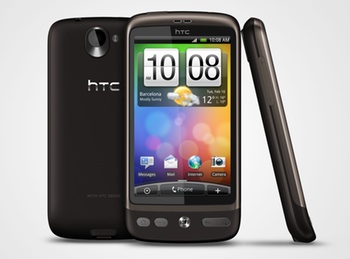
I’m reviewing the HTC Desire smartphone as part of the Telstra HTC Desire Social Review program.
Telstra has given 25 people, including me, a free HTC Desire handset as well as a bunch of credit on their Next G mobile network to provide “a mix of opinions and perspectives” on this so-called “superphone”.
Before we received our phones, we were asked to explain our expectations of the Desire. “We will be interested to compare this to your thoughts after the review,” said Telstra.
Here’s what I said:
HTC Desire is a “superphone”, eh? It should therefore integrate quickly and reliably into my workflows, and have the grunt to last a long working day. I reckon it could replace my laptop for staying in touch, coordinating my business and gathering media when I’m away from my desk. Android‘s meant to be “open”, so it should let me do things the way I want. I should beat my current Nokia N96 in every way.
Us reviewers will be using the hashtag #telstradesire so you can find our tweets, and Telstra will lead our discussions through a series of posts at Ben Bevins’ blog starting on Wednesday.
I’ve only just started to use the Desire. But here’s my initial impressions, along with a bit more information about what I hope to be able to do.
First up, despite the annoying hype about the Desire being an “iPhone killer” — why does everything have to be expressed in terms of mortal combat? — I won’t be comparing it with the iPhone. Mostly because I don’t have an iPhone. I also figure there’ll be other reviewers doing that particular comparison.
What I will be doing is seeing how much day-to-day work and play can be done on the Desire, leaving my MacBook Pro untouched.
Obviously there’s plenty the Desire won’t be suitable for, such as writing long articles and editing podcasts. But I’m guessing it’ll be fine for my extensive use of Twitter, quickly checking email and some routine web browsing. It’ll be interesting to see whether it can be used for lengthy reading sessions, managing my business through Basecamp, Kayako SupportSuite, Saasu for accounting, and WordPress and cPanel for the various websites I maintain.
I’ll also be seeing how good the camera is, for both stills and video.
I fired up the Desire, so to speak, on Friday and used it randomly for two days. My impressions?
- The industrial design is good. The Desire sits neatly in the hand. The only annoyance is that I keep hitting the volume control with my left thumb. Maybe I’m holding it wrong.
- There is no HTC synchronisation software for Mac, only Windows. Grrr. Have they just assumed that Mac owners will automatically get an iPhone and thrown in the towel?
- The 1GHz Qualcomm Snapdragon processor is nominally four time as fast as the Dual ARM 9 264MHz in my N96, but the Desire feels much faster than that. Scrolling is fast, smooth and responsive, as is zooming in and out of web pages.
- The built-in Twitter client, HTC Peep, didn’t seem capable of managing my heavy Twitter usage. I’ve installed the official Twitter for Android client and I’m much happier.
- I’m so pleased to be back on the fast, reliable Next G network, rather than the shoddy Optus network through my current provider Virgin Mobile. Using the two networks side by side while on the train on Friday, Next G was there — even through some tunnels — while Optus dropped back back to 2G or even no connectivity at all in some railway cuttings.
- I’m worried about battery life. Even with Bluetooth and Wi-Fi and GPS turned off, it took just five hours for the battery level to drop to 50% when out and about yesterday. That’s a bunch of Twitter and occasional web browsing over drinks. Maybe I can manage the power better.
- Browsing the Android Market is clear and simple, as is downloading and installing apps. Google Maps was the second download after Twitter for Android, and again the software is fast and responsive.
- I’ve set up one email account to use IMAP to synchronise back to my own server at Prussia.Net. It only synchronises the Inbox, not the Sent mail. I moved an email to Trash, but it disappeared entirely. This doesn’t inspire confidence.
I’m about to travel across town for dinner, and I’ll play along the way. And tomorrow will be my first workday with the Desire. So to speak. That name is just so lame. I’m not sure whether I’ll migrate the rest of mye email just yet, but we’ll see how I go with everything else.
[Disclosure: I have been given a HTC Desire handset by Telstra free of charge to review. The comments expressed by me reflect my user experience and personal opinion.]
Hey Stilgherrian,
You mentioned about the whole ‘iPhone killer’ topic. Heads up that I’ll be one of the reviewers making the comparisons (or why they shouldn’t even be compared at all.)
But yea, I’ve been strongly against the media and anyone else using that ‘could this be the iPhone killer?’ tag. People saying that always comes out as ignorant to me so I’m glad you’ve cleared your position clearly!
Synchronize software for your desktop? What would it do? Ur doing it wrong. Everything goes into the cloud. The cloud comes to your phone. That’s the way it works.
If you use some weird thing on your desktop, find a way to sync it to the cloud. Android is totally designed for you to drink the Google kool-aid. The sooner you take a gulp, the smoother the experience will be.
@Jacky: There ain’t anything wrong with making comparisons between the devices. Indeed, such things are useful for the new shopper. But the “killer” thing… Sigh.
@Simon Rumble: My concern is that I have many, many entries in both Apple’s iCal and Address Book. I don’t necessarily want all of them synchronised to the phone, because I don’t need or want that level of detail. Or perhaps it’s more a fear of the performance hit. They’re both very big files, as such things go.
I agree that Android is designed to do everything through Google. That is of course the commercial strategy. But my “personal productivity” is not with Google, so the phone needs to work with what I have. This is the core test for me.
There should be no problem syncing your calendar with Google Calendar (or multiple calendars, which is where it gets really good). I sync my work Outlook to GC and share my personal calendar and a calendar or family and friend birthdays with my partner, while she shares her calendar to me. It’s very helpful, and my work events don’t clutter her view of my personal events.
@simonrumble: Have had the TelstraDesire for a month now and looked for simple ways to synch multiple apps. Unfortunately the Calendar app is only able to sync with the primary account. By default, the phone will make you gmail account the primary account.
If you’ve added your Google Apps account as an additional account, the Calendar app won’t see it. It only sees the primary account.
I run Google Apps Premium and in order to set my Gapps Premium Account as the primary, I would need to do a hard reset of the phone.
@Simon Rumble: It really does start to look like a sip of that Google Kool-Aid is inevitable. Or a very large swig. Either that or run an Exchange server.
Following a recommendation from Neerav Bhatt I have taken a look at K-9 Mail for Android, which appears to offer better control compared with the HTC Mail client. It looks promising, but the explanation of how to set up different IMAP behaviours for different folders is… less than clear.
One general note about Telstra’s Social Review process, though, is that it’s condensed into a 2-week “campaign”. Normally I wouldn’t rush through migrating my workflows in such a short timeframe. I’d move one bit at a time, settle it in, then do the next step… and so on over a couple of months. Changing everything at once is, from my style of systems administration, a high-risk strategy.
You may get better mileage running your existing email account through Gmail and connecting to that (the Gmail application is naturally stronger, and Gmail handles IMAP quite well). It’s also likely that syncing your current address book and calendar the same way may work better.
I don’t know what you consider a “heavy” calendar, but I’ve got 20 or so calendars synced (again through Google) and the phone is not struggling with those.
Having “Gone Google” years ago – and using Android since the G1 came out, I completely ignored the Sync software, as associating the phone with a desktop seems archaic. Especially being a Linux user who never gets sync software anyhow.
I’d be interested in any review you could do on the bundled Telstra applications usefulness.
If you are running out of battery, try using Power Manager. I leave it quietly running in the background and it does what it can to keep my battery usage down. And I leave GPS on all the time (but only run GPS usage for 1-2 hour per day when cycling). It is highly configurable for different power-usage situations. Even though it is a paid app, there is a free trial period which you might be able to make use of during your review period. Also, task-killers seem to be popular for quickly shutting down apps to free up resources.
Since September I have had the Hero – another HTC with the volume button in an inconvenient place; I have simply learnt how to hold it so as not to keep changing ring-volume.
@Anton Fletcher: I agree that desktop sync isn’t the way to go. I probably shouldn’t have even mentioned it — except that such software often provides good ways to manage things like phone firmware updates. Anyway, forget I mentioned it.
I am still resistant to moving my email to Google. Currently it sits on a server which also handles email for my clients — as well as their websites and a bunch of random scheduled tasks. I have root access. I can see the logs directly to debug problems. I have clear escalation paths to the data centre support team when the problem is beyond my own skills — although that happens extremely rarely. Since this server exists anyway, running my personal stuff on it requires no extra sysadmin burden.
I simply don’t like the idea of putting my email somewhere where I can’t phone a systems administrator who will be able to work directly on my problem — including having someone walk to the specific physical machine hosting my files. I don’t like the idea of having to rely on spin-doctored corporate communications during unexpected downtime. I want clear, direct information from an actual sysadmin. When Google provides that level of support, I might reconsider.
More to the point, I don’t wish to completely reconfigure my email flow now just because I have a new phone. That seems like the tail wagging the dog. If the supposedly standards-compliant software on the phone can’t easily integrate into existing business systems, then something’s wrong.
@Robin Goodfellow: Ta for the tip. I knew such tools would exist.
I wasn’t suggesting you move your mail to Gmail, rather that you use Gmail as your protocol rather than IMAP, as I understand that the Gmail application is more mature than the generic email one. Other than setting up the account this shouldn’t change your workflow.
The sync software is a useful discussion to have as well – I’ve not used it, but that’s kind of why it’s a useful discussion – the phone is independent of computers.
If you haven’t already had one (Telstra had to update the first batch of these phones) the firmware will appear in your alert blind, and you can choose to download and install it when you’re ready.
For power-management I use Locale, it’s a little complex but does allows you to configure profiles depending on conditions – my wifi turns off when I’m not at home or work, and I have an alarm set to fire if I am at home or work, but my battery is low.
@Anton Fletcher: I’m confused as to what you mean by “the Gmail protocol”. I’ve not heard of such a thing and can’t quickly find a reference. Isn’t Gmail just a regular email hosting service, which you access using their web interface, or from external locations using plain old POP3 or IMAP and their Gmail client app or any other IMAP client?
To use Gmail for domains other than gmail.com, you seem to have two options:
Or am I missing something?
Either way, you still have the problem I wish to avoid. The email flows into a “black box” provider, where I can’t see the logs or — most importantly — there is no direct telephone or even prompt individual email or web-based support.
I think Simon Rumble is right. It’s a matter of drinking the Google Kool-Aid, moving everything to Google, and just Blindly Trusting Googleâ„¢.
There’s nothing wrong with email “in the cloud” per se. Ignoring the supposedly infinite elasticity of a “real” cloud service, which is the real differentiator, essentially everything on the internet is in the cloud in the sense that it runs through remote servers beyond one’s immediate control.
I’ve no doubt that Google can run a mail server as well as I can or better. But I don’t need five-nine’s reliability, I need information and support when things go wrong. With my current arrangements I know the support level I get, and it’s very good. With Google, while they say telephone support is listed under “limited access options” and there’s no mention of the response time. This doesn’t inspire confidence.
>> To use Gmail for domains other than gmail.com, you seem to have two options:… ..Open a paid Google Apps account and have the email delivered directly to Gmail as your email host, setting your domain’s DNS MX records to deliver email directly to Google.
There is also Google apps ‘standard’. The same service for free (less space, no sla, etc).
Now with that said, the built in email client should just work with IMAP. “But you should just move to google” isn’t a good excuse IMO.
Not really a protocol as such – but the Gmail application doesn’t use POP3 or IMAP to sync with the phone, so everything is a little more streamlined. My suggestion was that you setup Gmail as a mail-client like Thunderbird or Outlook, using IMAP to push and pull email from your current email box, and then attach the phone to that account – IMAP should handle the work between Gmail and your host, and Android will talk directly to that.
Think of it more like the missing syncing app – if you sync to Google services, the phone can pick them up. By no means do you need to use the Google services as your primary data-source.
I keep hitting the volume button too! Will have to remember to blog that.